| Step
1: |
Click
on Buy Now Above. A new window will open
to: https://changelly.com
|
| Step
2: |
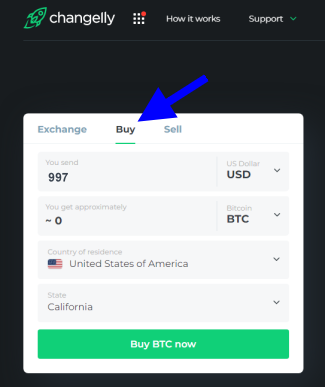
Start
by clicking on
the "Buy" tab. Then enter
the amount in USD of the Membership you
wish to buy. (ie: Basic: $997 USD) Prices
are listed just over to the lower right.
Send
funds to us at this bitcion address (copy
and paste, do not type it):
bc1qxj9xrdmqjy548hrh2ezd7thd6j44jyr38898rg
|
| Step
3: |
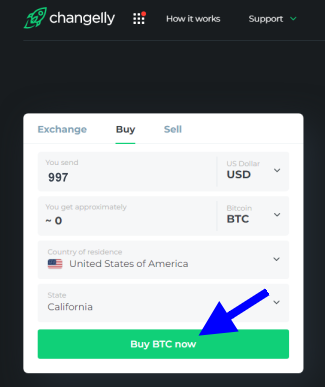
Then
click on the "Buy BTC now" button
|
| Step
4: |
On
the next screen you'll be given an option
to select which rate and processor you want
to go with. Choose which one and click the
"Buy Now" button. |
| Step
4: |
On the
next screen it will say: "Enter your
BTC wallet address".
Copy
and paste our BTC Address (show in blue
below). Paste it into the "To"
field. Also do not type in the address
to avoid any errors. Then click Continue.
bc1qxj9xrdmqjy548hrh2ezd7thd6j44jyr38898rg
(This is an example. Choose the Membership
you want.
Prices are listed just over on the right.)
You'll
be asked to confirm. Click the "I agree
with terms" box and then click the
"Go to Payment Button".
|
| Step
5: |
Select
the credit card option. Click continue. |
| Step
6: |
Enter
your credit card info. click on the "I
have read and agreed..." check box. Then
click "next". |
| Step
8: |
Review
the confirmation page and complete your
order. Your payment is now completed. The
transaction will be completed very shortly.
|
| Step
9: |
IMPORTANT:
Once you've sent your payment, then be sure
to send us confirmation of this by Clicking
Here
|
| Help: |
If
you have any problems please contact
us |
| |
NOTE:
The
https://changelly.com
payment option is available in most countries,
states, and provinces, with a few exceptions.
If this payment service is unavailable in
your area then click the back button or click
here to return to the payment options
page to select a different option. If you
require assistance please contact us. Thank
you. |


 “My
first real recruiting funnel.
187 signups in the first two weeks
alone. So exciting! I'm so grateful
for your powerful system. Thanks
again!
“My
first real recruiting funnel.
187 signups in the first two weeks
alone. So exciting! I'm so grateful
for your powerful system. Thanks
again!


